Sprint 1 Refinement - User Login
Overview
A React application and a Java backend using RESTful APIs, the connection from Java to a Postgres database via JPA, the Spring Security layer that authenticates users based on their authorities, and generates JWT tokens through the /login route.

Explanation:
- React Application: The frontend that makes HTTP requests to the RESTful API.
- RESTful API (Spring Boot): The backend that processes requests from React and interacts with the security layer and the database.
- Security Layer (Spring Security): Manages user authentication and authorization.
- /login: Endpoint where users send their credentials to obtain a JWT token.
- Verifies Authority: Confirms if the user has the necessary authority to access specific resources.
- Postgres Database: Stores the application's data.
- JPA: Used to interact with the database through entities.
- JPA Entities: Representations of database tables, allowing the application to interact with data in an object-oriented way.
- Authentication Flow: The user authenticates through the
/loginendpoint, and a JWT token is generated. This token is sent with subsequent requests to access protected resources. - Access Granted/Access Denied: The system determines whether the request can proceed based on the user's authorities.
1. Environment Management

Docker
To run the systems, we already have Docker containers configured in the application. To learn more about Docker, read our Docker usage guide
Docker Compose
In addition to the Docker configurations (Dockerfile), we have a complete Docker Compose setup that allows running all microservices and their respective databases with a single command. We have setups for both a development environment and a production environment.
To learn more about Docker Compose, read our Docker Compose usage guide
Commands to run the application's Docker Compose
To run a compiled version as if it were a production environment, run the command normally:
docker compose up -d
To see the progress of the running services, use the command to view console logs:
docker compose logs -f
To run a development environment using Docker, run the command below. A configuration exclusive for development has been added to this project, which shares your local folder with the containers, therefore listening to your modifications and updating the container automatically.
docker compose -f docker-compose-dev.yml -d
Running commands inside the container
The docker exec command plays a fundamental role in interacting with running containers, allowing developers and system administrators to execute additional commands inside an already active container. This functionality is especially useful for administration, debugging, and maintenance tasks, as it allows accessing a container's terminal or running scripts and processes without needing to restart the container or create a new instance. For example, by using docker exec -it <container_id> /bin/bash, the user can open an interactive shell session inside the container, making it easy to inspect the file system, check logs, or modify configurations in real-time. This ability to interact directly with the container's environment is essential for the efficient management of containerized applications, allowing for quick problem-solving and making updates or adjustments as needed.

2. ADMIN user registration story
This story requires the creation of the user entity with a "type" field that indicates the user type. This field will help us identify if the user is of the ADMIN type, which is the user type that can register other users.
Note
This is just an illustrative model; in practice, more fields will be necessary.
Command-line application
In a Spring application, we are also using the standard Java execution model, meaning the main method receives arguments normally, and deciding whether to run the Spring application can be optional:
@SpringBootApplication
public class UsermanagementApplication {

  public static void main(String[] args) {
    if (args.length > 0) {
      switch (args[0]) {
        case "register:admin":

          break;
      }
    } else {
      SpringApplication.run(UsermanagementApplication.class, args);
    }
  }

}
CommandLineRunner
CommandLineRunner is a Spring interface that allows the execution of specific code after the application has started, being called automatically by Spring Boot when the application is launched. By implementing the CommandLineRunner interface, developers can define logic that should be executed right after the application context is loaded, which is useful for tasks like data initialization, configuration checks, or service setup. The run(String... args) method is where this logic is placed, and the arguments passed to the application can be accessed through this method, allowing for customized application behavior based on startup parameters.

In our application, we can use it to register the admin user. Although this is not the exact purpose of this interface, if we use System.exit, we can register the admin and stop the application. In this case, we can perform the registration provided we have received the necessary parameters on the command line:
@Component
public class AdminRegistrationCommandLineRunner implements CommandLineRunner {

    @Autowired
    private UserService userService;

    @Autowired
    private ApplicationContext context;

    @Override
    public void run(String... args) throws Exception {
        // Check if the desired command was invoked
        if (args.length == 0 || !args[0].equals("register:admin")) {
            // if not, it means we are running the application normally, just exit the method
            return;
        }

        try {
            String name = args[1];
            String email = args[2];
            String password = args[3];

            // illustrative method call
            userService.cadastrarUsuario(name, email, password);

            System.exit(SpringApplication.exit(context, () -> 0));

        } catch (Exception e) {
            System.err.println("❌ Error registering user: " + e.getMessage());
            e.printStackTrace();
            System.exit(1);
        }
    }
}
Password Encryption
Spring Security provides built-in support for password encryption using the BCrypt algorithm, which is a secure and widely used approach to protect user passwords in applications. BCrypt not only encrypts the password but also adds a random salt, making the application more resistant to brute-force and dictionary attacks. To use BCrypt, you can inject an instance of PasswordEncoder into your service or controller class and use the encode() method to encrypt the user's password upon registration and the matches() method to verify the password when authenticating the user.
Example of BCrypt Usage in Spring
Here is an example of how to use BCrypt to encrypt user passwords in a Spring application:
- Configure the PasswordEncoder:
import org.springframework.context.annotation.Bean;
import org.springframework.context.annotation.Configuration;
import org.springframework.security.crypto.bcrypt.BCryptPasswordEncoder;
import org.springframework.security.crypto.password.PasswordEncoder;

@Configuration
public class SecurityConfig {

    @Bean
    public PasswordEncoder passwordEncoder() {
        return new BCryptPasswordEncoder(); // Defines the encoder for BCrypt
    }
}
- Use the PasswordEncoder in the User Service:
import org.springframework.beans.factory.annotation.Autowired;
import org.springframework.security.crypto.password.PasswordEncoder;
import org.springframework.stereotype.Service;

@Service
public class PasswordManager {

    @Autowired
    private PasswordEncoder passwordEncoder;

    public String registerUser(String username, String password) {
        // Encrypts the password using BCrypt
        String encryptedPassword = passwordEncoder.encode(password);

        return encryptedPassword;
    }

    public boolean validateUser(String rawPassword, String storedEncryptedPassword) {
        // Checks if the provided password matches the stored encrypted password
        return passwordEncoder.matches(rawPassword, storedEncryptedPassword);
    }
}
Code Explanation:
- PasswordEncoder Configuration: The
SecurityConfigclass defines a bean of typePasswordEncoder, configured to use BCrypt. - User Registration: In the
registerUsermethod of thePasswordManagerclass, the user's password is encrypted usingpasswordEncoder.encode(password), and the encrypted password can be stored in the database. - Password Validation: The
validateUsermethod usespasswordEncoder.matches(rawPassword, storedEncryptedPassword)to check if the password provided by the user matches the stored encrypted password.
3. Login and Route Protection Filter (middleware) Stories
Protecting endpoints with the security lib
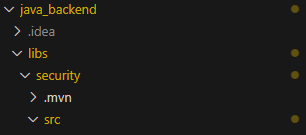
Enabling the module
The projects included in the challenge already have the Lib enabled, you just need to add it to the pom.xml
  <dependencies>
    <dependency>
      <groupId>com.ciandt.nextgen25</groupId>
      <artifactId>security</artifactId>
      <version>1.0-SNAPSHOT</version>
    </dependency>
  </dependencies>
Enable the functionality in the code
Just include the @EnableJwtSecurity annotation in a configuration class.
@Configuration
@EnableJwtSecurity
public class SecurityConfig
{

}
JWT token generation using JwtTokenService
The JwtTokenService is used in a Spring application to manage authentication based on JWT (JSON Web Tokens), enabling a secure and scalable approach to control access to resources. When authenticating a user, the service generates a token containing relevant information, such as the user's email and their permissions, signed with a secret key. This token is then returned to the client, who uses it in subsequent requests by sending it in the authorization header. The JwtTokenService also validates the token on each protected request, ensuring that the user is authenticated and authorized to access the requested resources. This approach favors the construction of RESTful APIs, where statelessness is essential, as each request can be authenticated independently through the token.
@PostMapping("/auth/login")
public ResponseEntity<String> login(@RequestBody UserLoginRequest userLoginRequest) {
    // Authenticates the user with the provided credentials
    authenticationManager.authenticate(
        new UsernamePasswordAuthenticationToken(userLoginRequest.getUsername(), userLoginRequest.getPassword())
    );

    // Generates a JWT token after successful authentication
    String token = jwtTokenService.generateToken(userLoginRequest);
    return ResponseEntity.ok(token); // Returns the token in the response
}
Reference Guide
Here are the most important documents to read for this sprint:
Keywords, Resources, and Prompt Examples
-
React
- Reference Link: React Documentation
- AI Prompt: "Generate an example of a functional component in React that displays a list of users."
-
Java
- Reference Link: Java Documentation
- AI Prompt: "Create a simple example of a Java class with methods to register and list users."
-
Spring Boot
- Reference Link: Spring Boot Documentation
- AI Prompt: "Generate an example of a Spring Boot application that configures a REST endpoint for login."
-
JPA (Java Persistence API)
- Reference Link: JPA Documentation
- AI Prompt: "Create an example of a JPA entity for the
Userclass with the fields name, email, and password."
-
PostgreSQL
- Reference Link: PostgreSQL Documentation
- AI Prompt: "Generate a SQL script to create a users table in PostgreSQL."
-
Spring Security
- Reference Link: Spring Security Documentation
- AI Prompt: "Create an example of a Spring Security configuration for authentication using JWT."
-
JWT (JSON Web Token)
- Reference Link: Introduction to JWT
- AI Prompt: "Generate an example of how to create and validate a JWT token in a Spring Boot application."
-
Docker
- Reference Link: Docker Documentation
- AI Prompt: "Generate a Dockerfile for a Spring Boot application."
-
Docker Compose
- Reference Link: Docker Compose Documentation
- AI Prompt: "Create a
docker-compose.ymlfile to orchestrate a Spring Boot application with a PostgreSQL database."
-
CommandLineRunner
- Reference Link: Spring Boot CommandLineRunner
- AI Prompt: "Generate an example of using
CommandLineRunnerto initialize data in a Spring Boot application."
-
BCrypt
- Reference Link: BCrypt in Spring Security Documentation
- AI Prompt: "Create an example of how to use BCrypt to encrypt passwords in a Spring Boot application."
-
Middleware (Next.js)
- Reference Link: Middleware in Next.js
- AI Prompt: "Generate an example of middleware in Next.js that protects a route with JWT authentication."
-
RESTful API
- Reference Link: RESTful API Concepts
- AI Prompt: "Create an example of a RESTful API in Spring Boot that implements CRUD operations for users."
-
Docker Networking
- Reference Link: Docker Networking
- AI Prompt: "Generate an example of a Docker network configuration for communication between containers."
-
JPA Entities
- Reference Link: JPA Entities
- AI Prompt: "Create an example of a JPA entity for a
Userobject with the appropriate annotations."
-
Exposing Ports in Docker
- Reference Link: Exposing Ports in Docker
- AI Prompt: "Create an example of a Docker command to start a container, exposing host port 8080 to container port 80."